|
And / Or Instruction |
|
Use this tab to select And/Or logic and to enable/disable destinations. (c) 2007-2008 Hermetech International Ltd. |
||
|
|||||
|
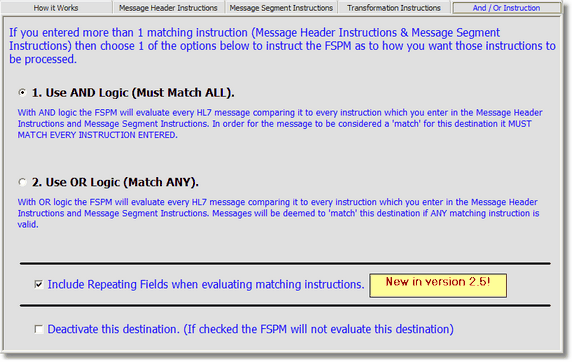
Use the And / Or Instruction tab to change the way that the FSPM will evaluate your Message Header and Message Segment Instructions. You can also use this tab to deactivate (disable) a destination or rubbish bin.
NEW in Version 2.5! Evaluate HL7 Repeating fields in the Message Segment Instructions! In prior versions of the FSPM a segment matching instruction would only evaluate the field/component indicated in the instruction and if the field was a repeating field it would ignore all but the first instance of the field. Now, by checking the box in the And / Or Instruction tab you can tell the matching engine to also consider all repeating instances when evaluating the instruction. **NOTE: Repeating fields are ONLY evaluated in Message Segment Instructions NOT Message Header Instructions and Transformation Instructions.
Example:
PV1 Field 7: BDUKE121^Duke^Bryan~JJONES445^Jones^James^M~DCOX334^Cox^Donald
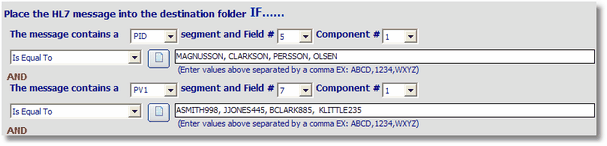
Consider the example data above. The PV1 field in this example is a HL7 repeating field with 3 different instances. The matching instruction for PV1 field 7 component 1 is to match if the value is equal to any value in (ASMITH998, JJONES445, BCLARK885, KLITTLE235). If you DO NOT have the 'Include Repeating Fields' box checked then the matching instruction would fail to match because the FSPM would only look at the FIRST instance of PV1.7.1 (which is BDUKE121 in the example data and is not in the list of valid matches). If the box IS CHECKED (as shown in the top screenshot) then this instruction would would match because the FSPM would check EVERY instance of PV1.7.1 to see if it contained a valid match and if ANY ONE matches (as instance #2 JJONES445 does) then the PV1 instruction would be considered to have successfully found a match. |