|
Creating Message Destinations |
|
Adding and Editing HL7 message destination and transformation instructions (c) 2007-2008 Hermetech International Ltd. |
||
|
|||||
|
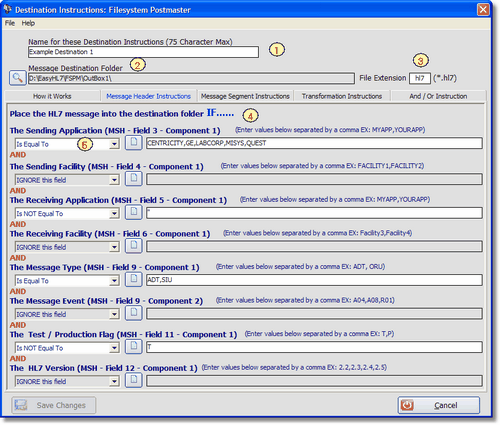
From the main window open the Destination Instructions window. In this window you enter matching instructions based on either the MSH segment (Message Header Instructions) or the actual HL7 message content (Message Segment Instructions). You can also enter rules to 'transform' the message (Transformation Instructions) i.e. to actually change the content of the message dynamically before delivering it to the destination folder. You can also create special destinations called 'Rubbish Bins' which will filter out unwanted HL7 messages.
In the Message Header Instructions you enter matching rules for your destination based on various fields in the MSH segment of the HL7 message. You can enter values in any or all of the matching instructions here, but be aware that the message must match ALL of the instructions you enter.
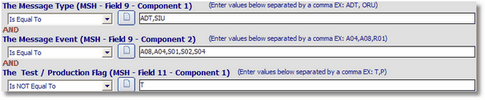
Scenario1: The message type is either ADT or SIU.
If this were the ONLY matching instruction entered then of the 2 MSH segments shown below ONLY #1 would be delivered to this destination. #1) MSH|^~\&|APP1|FAC1|APP2|FAC2|20031111163831|NO SECURITY|ADT^A08|153681279959711|T|2.3|00051||AL| #2) MSH|^~\&|APP1|FAC1|APP2|FAC2|20031111163831|NO SECURITY|ORU^R01|153681279959711|T|2.3|00051||AL|
Scenario2: The message type is either ADT or SIU and there are other instructions based on the Message Event and the Test/Production Flag.
Based on the instructions entered for Scenario, consider the following MSH message segments:
#1) MSH|^~\&|APP1|FAC1|APP2|FAC2|20031111163831|NO SECURITY|ADT^A08|153681279959711|P|2.3|00051||AL| #2) MSH|^~\&|APP1|FAC1|APP2|FAC2|20031111163831|NO SECURITY|ORU^R01|153681279959711|P|2.3|00051||AL| #3) MSH|^~\&|APP1|FAC1|APP2|FAC2|20031111163831|NO SECURITY|SIU^S01|153681279959711|P|2.3|00051||AL| #4) MSH|^~\&|APP1|FAC1|APP2|FAC2|20031111163831|NO SECURITY|ADT^A31|153681279959711|P|2.3|00051||AL| #5) MSH|^~\&|APP1|FAC1|APP2|FAC2|20031111163831|NO SECURITY|SIU^S01|153681279959711|T|2.3|00051||AL|
HL7 messages with the MSH Segments #1 and #3 would be delivered to this destination while #2, #4 and #5 would not. MSH #4 has the right Message Type (ADT) but the Message Event (A31) does not match the instructions which say that the Message Event MUST BE EITHER (A08,A04,S01,S02,S03 or S04). MSH #5 matches the message type and message event (SIU^S01) but the Test / Production flag (MSH Field 11) IS NOT "T" as required by these instructions.
Further Information
When the EasyHL7 Filesystem Postmaster evaluates HL7 message files it will test each message in the file against the matching criteria you enter. If the message matches ALL of your matching criteria instructions (when using AND logic) or if it matches ANY of your instructions (when using OR logic) the message will be placed in the Message Destination Folder selected above. If a message matches the instructions for more than 1 destination, then a copy of the message will be placed in each Message Destination Folder. It is important to know that if you have several 'Destinations' that all point to the same Message Destination Folder the Postmaster WILL place more than one copy of each message into a particular folder if it matches BOTH destinations.
Enter your destination instruction matching criteria in the Message Header and/or Message Segment instruction tabs. Your entries are NOT case sensitive (ADT, aDT and adt are considered identical). To test for blank in a field enter 2 single quotes ''. NOTE that if used then '' can be the only criteria in that field. Also, it is important to know that when evaluating the matching criteria only Alpha-Numeric characters (0-9 and A-Z) and double quotes (to hande a search for an HL7 explicit NULL "") in matching criteria are considered when evaluating the data in a field. For example, the values LABCORP, LAB CORP, LAB;CORP and LAB CORP are all considered identical.
If you want a copy of EVERY HL7 message to go to a destination, just enter a Destination Name, a Message Destination Folder and make sure that 'Ignore' is checked in all of the header and segment instruction fields.
|