|
Message Segment Instructions |
|
Enter 'Matching' instructions for HL7 message content (c) 2007-2008 Hermetech International Ltd. |
||
|
|||||
|
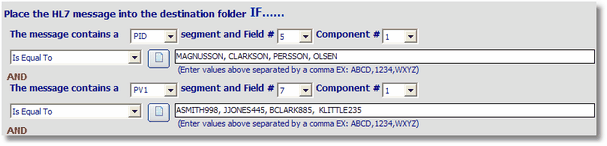
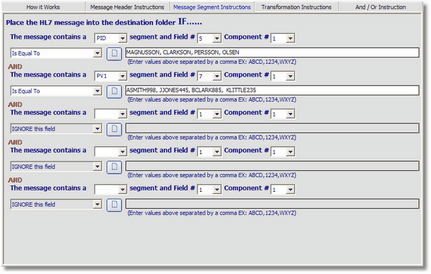
Use Message Segment Instructions to have the FSPM filter HL7 messages for a destination by evaluating the message content. You can enter up to 5 sets of matching instructions. Instructions are aggregate (note the AND in the screenshot) i.e. when evaluating the message must match ALL instructions. NOTE: it's important to keep in mind that ALL Message Transformation Instructions are performed AFTER the message has been evaluated against the matching instructions.
 Message Segment Matching Instructions
Using information in the screenshot above, this destination would evaluate the following.
SUMMARY: For any HL7 message to be delivered to this destination it MUST match any Message Header Instructions entered (if any) AND it MUST contain both a PID and a PV1 segment AND the patient's last name CANNOT BE MAGNUSSON, CLARKSON, PERSSON or OLSEN AND the Attending Physician's ID code MUST be ASMITH998, JJONES445, BCLARK885 or KLITTLE235. All other HL7 messages would be ignored by this destination.
|