|
Product Activation |
|
How to activate your program. (c) 2007-2008 Hermetech International Ltd. |
||
|
|||||
|
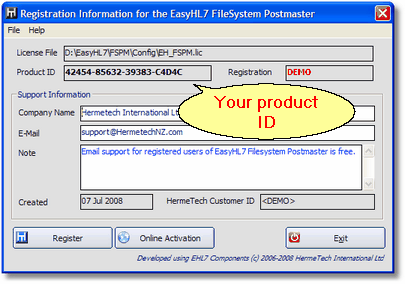
In the 'File' menu of the main window click 'Registration Info' to open the registration information window.
There are several ways to activate your EasyHL7 product once you have purchased your license. If your computer is connected to the internet, you can use online activation. Click HERE for more instruction on activating online.
A relatively new feature we've implemented is the EasyHL7 License Manager. It's a free, easy to use and install program which lets you generate product activation keys for your EasyHL7 Products. If the computer with your EasyHL7 product(s) installed does not have an internet connection, you can use the EasyHL7 License Manager from a computer that DOES, and generate a product activation key for the isolated computer. All you'll need is your EasyHL7 logon information and the Product ID (See above screenshot) from the computer with the EasyHL7 product.
 Download the EasyHL7 License Manager
You can also activate your product online in your web-browser by visiting http://www.hermetechnz.com/EasyHL7 and visiting the 'Product Activation' page which is in the 'Purchase' menu.
Should you have any questions or concerns, don't hesitate to contact us. Visit the website for contact email addresses and phone numbers:
http://www.hermetechnz.com/EasyHL7/Contact.asp
|