Rubbish Bins

PreviousNext

Use 'Rubbish Bin' destinations to filter out unwanted messages.

(c) 2007-2008 Hermetech International Ltd.

'Rubbish Bin' destinations allow you to filter out unwanted HL7 messages. If your HL7 interface NEVER processes HL7 message type ADT or SIU then you can create a Rubbish Bin that would match any message where the HL7 Message Type is ADT or SIU.

 

Message Header Instruction in a Rubbish Bin

Message Header Instruction in a Rubbish Bin


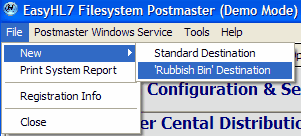
You create 'Rubbish Bin' destinations by clicking 'New' and then 'Rubbish Bin' in the 'File' menu of the main window.


A Rubbish Bin destination is created in exactly the same way as a normal destination with only a couple of minor differences.
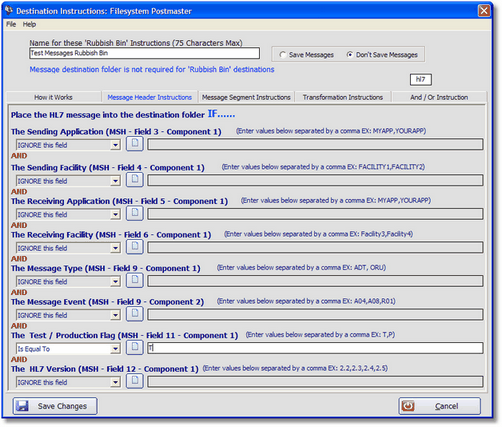
 

1.You don't have to select a Message Destination folder. If you don't specify a destination folder, then any messages that match a rubbish bin are just automatically purged and are NOT written to disk.
2.If you do not elect to use a destination folder, any 'Transformation Instructions' you might enter are ignored.
3.If you do elect to use a destination folder, then matching messages will be saved in that folder (just as with other destinations) including any transformations you may have configured.


Creating a New Rubbish Bin Destination

Creating a New Rubbish Bin Destination


In the Main Window you can see a list of all of your message destinations. Rubbish Bin destinations will always be at the top and are indicated by the Rubbish Bin icon.
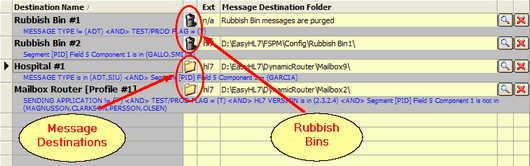
 

Message Destinations List

Message Destinations List


Additional Information About Rubbish Bins


A 'Rubbish Bin' is a special Filesystem Postmaster destination. It follows the same rules as a regular destination with a couple of key differences.


Rubbish Bins are always processed FIRST before any of your other destinations. They are processed in ALPHABETICAL order.
Any messages that match ALL of the matching criteria for a rubbish bin will NOT be processed by any other destination (even other rubbish bins). Rubbish Bins effectively 'EAT' any matching messages preventing them from processing further.
You can elect to select a Message Destination Folder or not (unlike other destinations). If you choose to use one the Rubbish Bin will place all matching messages into that folder just as with any other destination.
If an HL7 message does not match any rubbish bins then it is passed on to the standard message destinations for evaluation.