|
When running locally you can see the FSPM working.
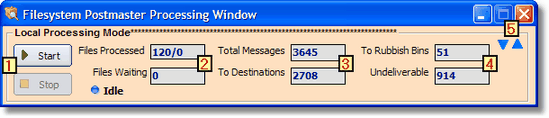 Local Processing Window (Minimal)
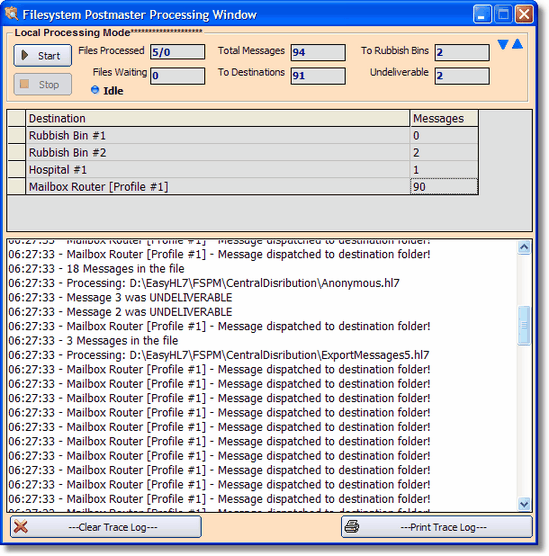 Local Processing Window (detailed)
|

|
These buttons will start or stop the local processing window, or the process will be automatically stopped when you close the window!
|

|
Files Processed: will have the number of files processed / number of Error files encountered. So 120/0 would indicate that since starting the FSPM has processed 120 HL7 data files and moved 0 to the PM-ErrorFiles folder. Files Waiting: indicates the number of HL7 data files waiting in the central distribution folder.
|

|
Total Messages: Indicates the total number of HL7 messages evaluated by the FSPM. To Destinations: Will indicate how many HL7 messages have been delivered to standard destinations. NOTE: It is possible for this number to be GREATER than the Total Messages number because the FSPM can deliver 1 message to more than 1 destination and this number counts every message delivered.
|

|
To Rubbish Bins: Indicates the number of HL7 messages which matched 'Rubbish Bin' destinations. Undeliverable: Will show how many HL7 messages were undeliverable (i.e. they matched NO matching instructions for either a rubbish bin or a standard destination).
|

|
Use the blue Up / Down toggle arrows to switch between the minimal (default) window and the detailed view.
|
Upgrading your Desktop Only (Basic) license to a Professional license
If you wish to upgrade your 'Desktop Only' license to a Professional license contact customer service at info@hermetechnz.com for information. You can upgrade at any time!
|