|
Running the Postmaster |
|
Run it as a desktop application OR as a MS Windows Service (c) 2007-2008 Hermetech International Ltd. |
||
|
|||||
|
Run the FSPM either as a MS Windows Service or as a simple desktop application depending which license you purchase. A Desktop only (Basic) license allows you to run the FSPM locally as a desktop application. With a Desktop only license, you cannot register or run the FSPM windows service application (EHSVC_FSPM.exe) but the basic license is significantly less expensive than the professional. Professional license holders can run the FSPM EITHER as a MS Windows Service (click the 'Run as a Service' button) or as a desktop application (click the 'Run Locally' button).
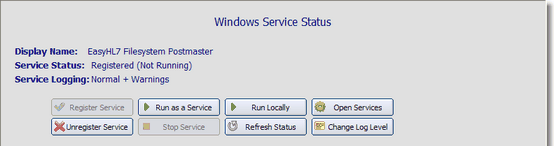 FSPM Service Status (Professional Version)
If you own a professional license you must first 'Register' the FSPM as a windows service. Do this by clicking the 'Register Service' button shown above. After you've done this you will be able to either click the 'Run as a Service' button OR start / stop the services right from the MS Windows Services snap-in (click 'Open Services' button). You will find the FSPM listed as 'EasyHL7 Filesystem Postmaster' in your list of windows services (see below)
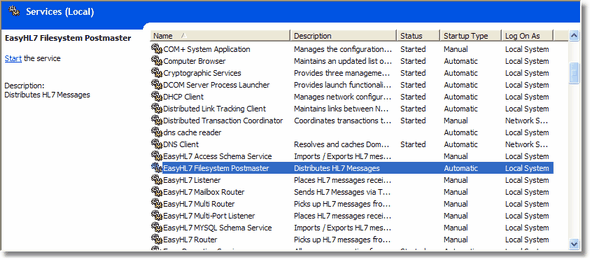 The MS Windows Services snap-in
When running as a service, the FSPM runs completely silently, in the background. The only interface is here in the Windows Service Status tab OR through the program log files.
When running as a windows service, the FSPM will automatically log system events. These log files will be in the application folder where you installed the FSPM program and will always be named [EHSVC_FSPM.<datestamp>.log]. The service will automatically purge .log files that are more than 7 days old. Control which system events get placed into the log file by changing the system log level (click the 'Change Log Level' button).
|