|
TableLookup(parm1,[parm2],[parm3]) |
|
How to use the TableLookup() Macro (c) 2007-2008 Hermetech International Ltd. |
||
|
|||||
|
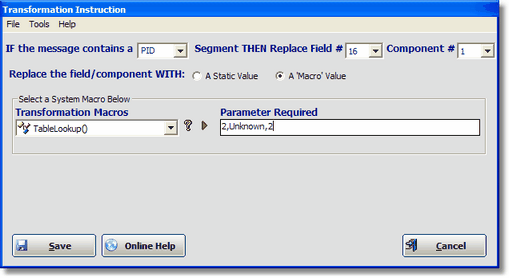
TableLookup() Example PID 16.1 (Marital Status)
Use the TableLookup() macro to dynamically replace a component value based on it's content. When processed it will take the value in an HL7 field component (in the screenshot above PID 16.1 'Marital Status') look up that code value in an HL7 Table. If found it will replace a component value with table value.
Parameters - The TableLookup() macro requires 1 parameter but can take up to 3 parameters separated by a comma. They are:
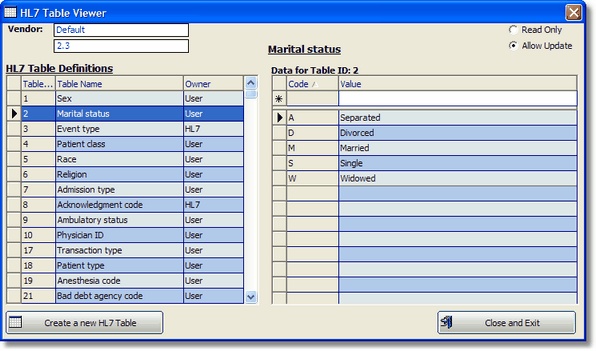
In the example above (2,Unknown,2) the FSPM is instructed to look up the value it finds in PID field 16.1 in HL7 Table #2 (Marital Status) and if found replace PID field 16.2 with the table value, if NOT found replace PID field 16.2 with "Unknown".
What are HL7 Tables? HL7 Tables are embedded in the EasyHL7 Vendor definition (Default 2.3). Each table is identified by a number (parameter 1) and has 2 fields (Code and Value). You can edit the HL7 Tables OR create new ones by clicking 'View / Edit HL7 Tables' in the 'Tools' menu.
EasyHL7 Table Editor |