|
Testing Your Settings |
|
Run a complete systems test (c) 2007-2008 Hermetech International Ltd. |
||
|
|||||
|
The Testing Window allows you to test your FSPM configuration without actually modifying or deleting any HL7 data files. You can manually select a file containing HL7 messages, tell it to test one, some or all of your destinations and the tester will evaluate up to 100 messages in that file and tell you:
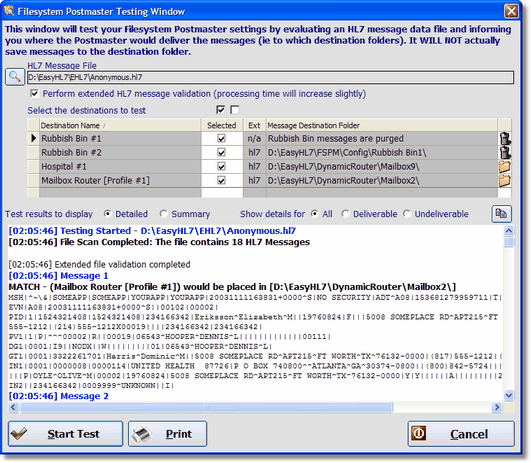 FSPM Testing Window
[12:08:40] Testing Started - D:\EasyHL7\EHL7\Anonymous.hl7 [12:08:40] File Scan Completed: The file contains 18 HL7 Messages
Total Messages in File: 18 Deliverable: 18 Undeliverable: 0 Rubbish Bin Count: 2
Destination Summary Rubbish Bin #1 [No messages matched this destination] MESSAGE TYPE != (ADT) <AND> TEST/PROD FLAG = (T) Rubbish Bin #2 [2 messages] to folder: D:\EasyHL7\FSPM\Config\Rubbish Bin1\ then purged! Segment [PID] Field 5 Component 1 is in (GALLO,SMITH) Hospital #1 [1 messages] to folder: D:\EasyHL7\DynamicRouter\Mailbox9\ MESSAGE TYPE is in (ADT,SIU) <AND> Segment [PID] Field 5 Component 1 = (GARCIA) Mailbox Router [Profile #1] [16 messages] to folder: D:\EasyHL7\DynamicRouter\Mailbox2\ SENDING APPLICATION != ("") <AND> TEST/PROD FLAG = (T) <AND> HL7 VERSION is in (2.3,2.4)
[12:08:40] Test completed in < 1 seconds
|