Schema profiles contain instructions which tell the program how to connect to the database. A special note for MS Windows Server 2003 or later, see the section on DEP!
Create / Edit database schema profiles by clicking the 'New Profile' button or 'Edit Profile' button in the 'EasyHL7 DB Schemas' tab.

When you are creating a Schema Profile you can choose whether the program will connect directly to the MS Access database OR to use an ODBC System DSN to connect.
Section 1: Connecting to the database directly:
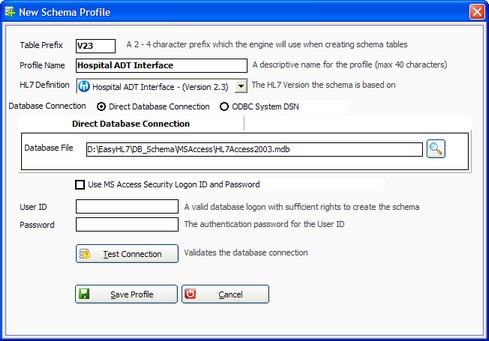
New Schema Profile Window (Database Direct Connection)
| • | Table Prefix: This is a 2-4 character prefix which will be used by the program when creating the database objects (tables etc). For instance one of the main tables that is created is called <PREFIX>_HL7Data, so if you created a profile with a Schema Prefix of V23 all the database objects will be named V23_<TableName> or in this instance V23_HL7Data. See navigating the schema for more information on this. Prefixes must begin with a letter (A-Z). |
| • | Profile Name: This is a user-defined descriptive name for the profile. No 2 profiles can have the same name. |
| • | HL7 Definition: The EasyHL7 Vendor/Version definition used by the schema. |
| • | Database Connection: The connection type (database direct or ODBC). |
| • | Database File: The MS Access database file name. *IMPORTANT* If you intend to run the schema engine as a Windows Service then we recommend strongly that the database file reside on a LOCAL disk drive. If the database is on a network share then the Windows Service must run as a Domain User with access to that share! |
| • | Database: The file name of the Access database to connect to. |
| • | User ID: (Optional) The User ID to use when connecting to the database (If Access is configured to use Security). |
| • | Password: The password. |
Section 2: Connecting to the database with an ODBC Connection:
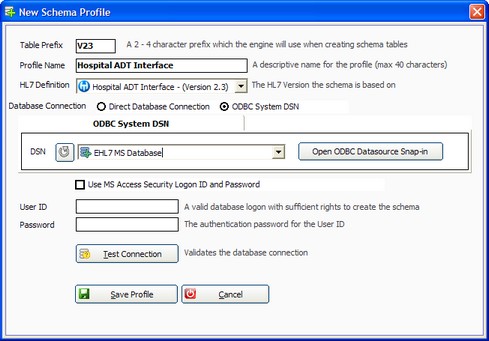
New Schema Profile Window (Database Direct Connection)
| • | Table Prefix: This is a 2-4 character prefix which will be used by the program when creating the database objects (tables etc). For instance one of the main tables that is created is called <PREFIX>_HL7Data, so if you created a profile with a Schema Prefix of V23 all the database objects will be named V23_<TableName> or in this instance V23_HL7Data. See navigating the schema for more information on this. Prefixes must begin with a letter (A-Z). |
| • | Profile Name: This is a user-defined descriptive name for the profile. No 2 profiles can have the same name. |
| • | HL7 Definition: The EasyHL7 Vendor/Version definition used by the schema. |
| • | DSN: A Data Source Name that has been set up for an ODBC connection the database that holds your EasyHL7 Schema. *IMPORTANT* This should be a SYSTEM DSN, any other type of DSN may require that you configure the Windows Service to run under the context of a Domain User with access to that DSN. |
| • | Database: The file name of the Access database to connect to. |
| • | User ID: (Optional) The User ID to use when connecting to the database (If Access is configured to use Security). Note that this is not required and should not be used if the user id and password are saved with the DSN. |
| • | Password: The password. |
Click 'Save Profile' when completed. Note that creating a profile DOES NOT automatically build all of the schema objects (see below).

Schema Connection Properties for a newly created profile
See Next: Creating Tables