This section assumes that you have a working knowledge of MS Access. Navigate the Schema using the Query engine in Access or your own custom code. To get a quick start on browsing the schema tables we strongly recommend that you try using the Schema Browser. It allows you to generate queries and view the resulting SQL statements. This will be of great help for you in determining how to write your own queries or views to retrieve your HL7 data.
The most common navigation need is to retrieve HL7 message data that has been imported into the system. To do this there are 2 tables which will be of extreme importance to you.
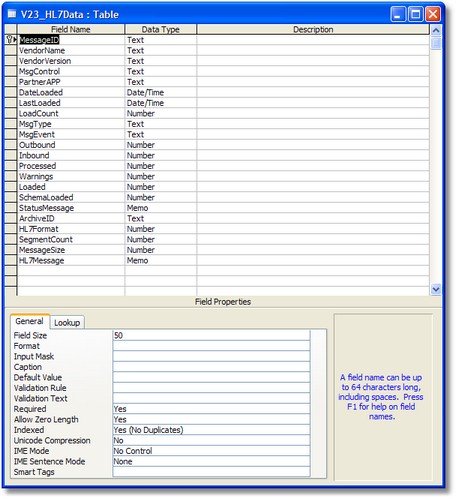
| 1. | The <PREFIX>_HL7Data table. This is the SCHEMA MASTER TABLE. It is the main data warehouse table for your HL7 data. It contains some header information, the MESSAGEID and the entire HL7 message in a Text column. |
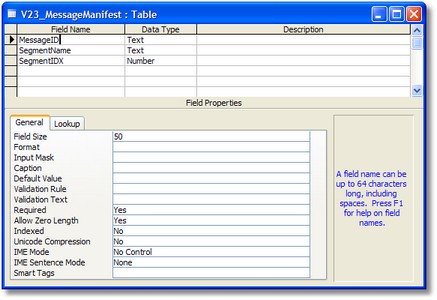
| 2. | The <PREFIX>_MessageManifest table. This table is like a table-of-contents for each HL7 message. It will tell you which HL7 segments were included in the message (from which you can derive which table(s) contain message data) and their sequence within the message. |

The Schema Master Table <prefix>_HL7Data
The Message Manifest table <prefix>_MessageManifest
|
Another important thing you'll need to know before you start retrieving HL7 data elements is how to determine which Access Table contains the data element(s) you're looking for. All of the segment data tables will be dynamically named based on three things, the Schema Prefix, the HL7 Segment Name and the SIZE of HL7 data fields that segment contains. HL7 Message segments are made up of multiple HL7 data fields. Each HL7 data field is a specific HL7 Data Type and contains 1 or more (usually more) components. Each COMPONENT will represent 1 database field in an Access Table.
If the HL7 segment contains 40 or more HL7 data fields (like the GT1 [Guarantor Data] or IN1 [Insurance Information] segments), the segment will be represented by two tables.
Example: If the Schema Prefix is V23 the table for the PID (Patient Information) will be named V23_Segment_PID_A. The IN1 (Insurance Information) segment tables would be named V23_Segment_IN1_A which would hold data for fields 1-39 and V23_Segment_IN1_B which would hold data for fields 40-nnn.
The SQL Statement:
Select * from v23_Segment_PID_A Where MessageID = '9A3FF083DE1F384584553969F1745497' Order By IDX
Would return 1 row for each PID segment contained in the message.
Of equal importance is how to identify which data fields you care about within each table. Here is where some knowledge of HL7 structure is required. HL7 Message segments are made up of multiple HL7 data fields. Each HL7 data field is a specific HL7 Data Type and contains 1 or more (usually more) components. Each COMPONENT will represent 1 database field in an Access Table. ALL Segment data fields will be defined either as Text or Memo Access data types. When you use the schema engine to create the tables (see Creating Tables) the program will analyze the HL7 Vendor Definition used in the Schema to determine how many tables to create and what they should be named.
A common question we receive is "Why are there so many Access Tables created?". The answer is really pretty simple. MS Access has a built-in restriction when installed which limits the number and size of data fields you can place into a single table (Max Size is 2KB excluding Memo fields). An HL7 Segment may be made up of 80 HL7 fields which in turn have 7 or 8 components each, etc etc. Take for instance the Patient's Last Name (the PID Segment Field #5) which is usually an HL7 data type XPN (Extended Person's Name) which usually contains 7 components. The Schema engine creates 7 Access database fields of 40 characters each to hold data. This means that for every HL7 data field of type XPN the engine must create 7 access fields for a total size of 280 characters. Using this logic if an HL7 Segment consisted of only TEN HL7 data fields and each one was of a type XPN the engine would have to create TWO Access tables to hold the data.
As an example we'll use a common field that everyone can relate to: The patient's last name. Assuming a Schema Prefix of v23, to access the patient's last name first you need to know which segment in the message contains it (the PID segment). This gives you the table name V23_Segment_PID_A. To know which field contains the patient's last name you have know which HL7 data field contains the patient name and which specific COMPONENT within that field contains the last name (Field 5 Component 1). Field names within the tables will be derived as <segment>_F<fieldnumber>_C<componentnumber> so the field name for the patient last name is: PID_F5_C1
The SQL Statetment:
SELECT IDX, PID_F5_C1 As LastName, PID_F5_C2 As FirstName
FROM v23_segment_pid_a v
WHERE MessageID = '053B06284340B64C8EF6D79BD2AB3817'
Order By IDX
Would return 1 row containing the patient's last name for each PID segment contained in the message.
.
Segment: PID-Patient identification segment 30 Fields
# Description Len Type Table #Comp
1 Set ID - PID 4 SI 0 1 2 Patient ID 20 CX 0 6 3 Patient Identifier List 20 CX 0 6 4 Alternate Patient ID - PID 20 CX 0 6 5 Patient Name 48 XPN 0 7 6 Mother's Maiden Name 48 XPN 0 7 7 Date/Time of Birth 26 TS 0 2 8 Sex 1 IS 1 1 9 Patient Alias 48 XPN 0 7 10 Race 80 CE 5 6 11 Patient Address 106 XAD 0 9 12 County Code 4 IS 289 1 13 Phone Number - Home 40 XTN 0 8 14 Phone Number - Business 40 XTN 0 8 15 Primary Language 60 CE 296 6 16 Marital Status 80 CE 2 6 17 Religion 80 CE 6 6 18 Patient Account Number 20 CX 0 6 19 SSN Number - Patient 16 ST 0 1 20 Driver's License Number - Patient 25 DLN 0 3 21 Mother's Identifier 20 CX 0 6 22 Ethnic Group 80 CE 189 6 23 Birth Place 60 ST 0 1 24 Multiple Birth Indicator 1 ID 136 1 25 Birth Order 2 NM 0 1 26 Citizenship 80 CE 171 6 27 Veterans Military Status 60 CE 172 6 28 Nationality 80 CE 212 6 29 Patient Death Date and Time 26 TS 0 2 30 Patient Death Indicator 1 ID 136 1
Data Type: XPN - Extended person name (7 components) Category: Demographics Instructions: 2.8.51 replaces the PN data type. <family name (ST)> ^ <given name (ST)> & <last_name_prefix (ST)> ^ <middle initial or name (ST)> ^ <suffix (e.g., JR or III) (ST)> ^ <prefix (e.g., DR) (ST)> ^ <degree (e.g., MD) (IST)> ^ <name type code Component 1 [ST] family name (last name) Component 2 [ST] given name (first name) Component 3 [ST] middle initial or name Component 4 [ST] suffix (jr, sr, etc) Component 5 [ST] prefix (Mr, Mrs, Dr etc) Component 6 [ST] degree (MD, PHD etc) Component 7 [ID] name type code
|