Running as a Service

Contents
 IMPORTANT: You cannot install or run the UltraPort Router Windows Services if you are using either a DEMO or Developer license (See Software Licenses for more information).
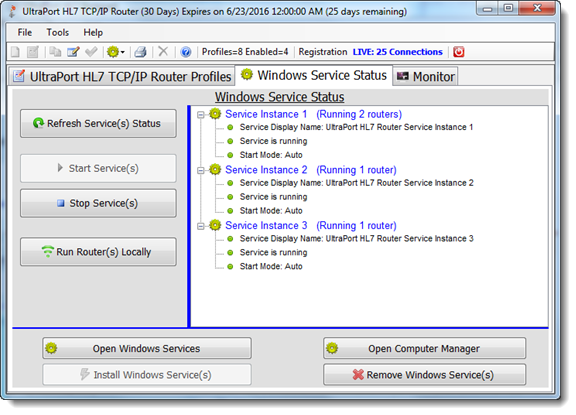
Running the HL7 Sender as a Windows Service
In order to run the UltraPort Router MS Windows Services you must have purchased a license and activated your software (see Getting Started). Whenever you click on the "Windows Service Status" tab the Router Configuration program will refresh the current state of the Router services in relation to which service instance you indicated should run each router in the Router Profiles (See Creating Router Profiles).
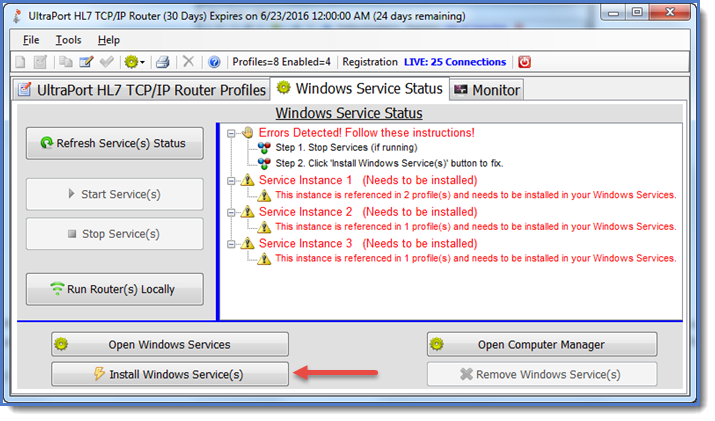
Errors Detected
If the system detects any errors they will be noticeable in the status display as shown above. Before you can start the services you must first install (register) the correct Service(s) into your MS Windows Services list. To do this click the 'Install Windows Service' button. To run the profiles locally (as a desktop application) click the Run Router Profiles Locally button.
After you click the Install Windows Services button you should see that the Registered field is now True and the Startup field is now Auto. Also, the 'Start Service' button should now be enabled.
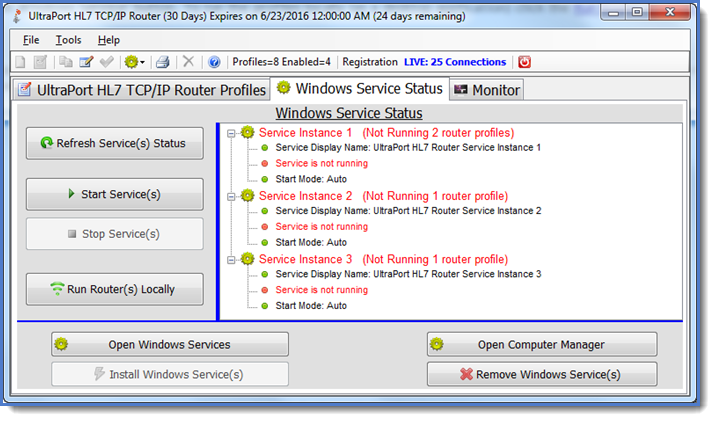
After the service(s) are installed. Ready To Start!
IMPORTANT NOTE: Should you decide to uninstall the UltraPort Router (or if you are updating your software by reinstalling a newer version) you should ALWAYS make sure that the MS Windows Service is STOPPED. If you are uninstalling the software you should also unregister the MS Windows Service by clicking the 'Remove Windows Service(s)' button.
You will now also be able to see the windows service in your computer's windows services snap-in (click the Open Windows Services button).
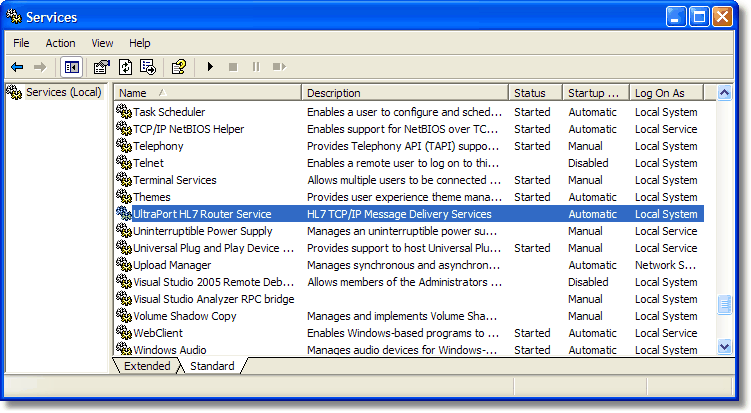
The MS Windows Services List
To start the service click the 'Start Service' button (or right click on the service in the MS Windows Services list and click 'Start').
To stop the service click the 'Stop Service' button.
To remove the service from your MS Windows Services list you must first stop the service (if it is running) and then click the 'Remove Windows Service' button.
If you experience trouble starting the MS Windows Service here are a few things you can look at.
1. Is your license file valid? Verify this by starting the Router configuration program. If the license is NOT valid that program will show the program as running in DEMO mode (or give a similar error). You can also look in the installation folder for log files (files with a .Log file extension) which might provide some clue.
2. Is UAC an issue? Try modifying the .EXE file properties and have the configuration program and the service programs run as an Administrator.
3. Try running the Windows Service under a domain User account (rather than the default "Local System" account). In the MS WIndows Services (see screenshot above) right click on the appropriate service and select "Properties" then go to the "Log On" tab. We recommend that you first try with YOUR own account (just to test) and then move forward if needed to use another dedicated Windows user account.
4. Create an Application Config File (click HERE for how-to).
See also: Troubleshooting, Frequently Asked Questions, UAC, DEP