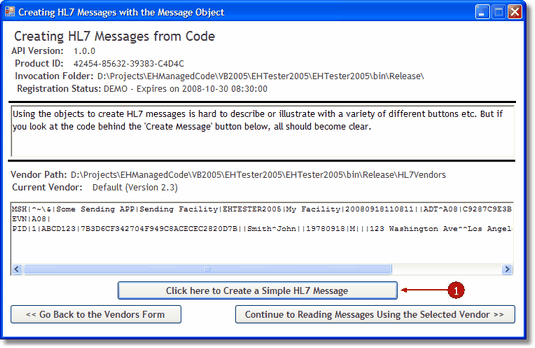
'EXAMPLE CODE FROM THE FORM
'oVendor declared PRIVATE
'and instantiated at form load
Private Sub btnCreateMessage_Click(ByVal sender As System.Object, ByVal e As System.EventArgs) Handles btnCreateMessage.Click
Try
Dim oMSG As EHL7_mc2005.EasyHL7Message
Dim oSegment As EHL7_mc2005.HL7MessageSegment
Dim sBuffer As String = ""
oMSG = oVendor.NewHL7Message
With oMSG
oSegment = .CreateMessage(True)
'oSegment is now the MSH segment object
'Set the Sending APP/Receiving APP and other MSH fields
.SetFieldValue("Some Sending APP", oSegment, 3, 1)
'OR the following code is functionally the same
oSegment.Field(4).Value(1) = "Sending Facility"
'And continue using the SetFieldValue method in the message object
.SetFieldValue("Sending Facility", oSegment, 4, 1)
.SetFieldValue("EHTESTER2005", oSegment, 5, 1)
.SetFieldValue("My Facility", oSegment, 6, 1)
.SetFieldValue("ADT", oSegment, 9, 1)
.SetFieldValue("A08", oSegment, 9, 2)
'Create a Message Control Number. Using a GUID which is NOT strictly HL7 compliant (too long)
.SetFieldValue(oVendor.CreateGUID(), oSegment, 10, 1)
'Now add another segment
oSegment = .AddSegment("EVN")
.SetFieldValue("A08", oSegment, 1, 1)
'Now add the PID segment
oSegment = .AddSegment("PID")
.SetFieldValue("1", oSegment, 1, 1)
'The patient IDs in fields 2 and 3
.SetFieldValue("ABCD123", oSegment, 2, 1)
.SetFieldValue(oVendor.CreateGUID(), oSegment, 3, 1)
'The patient name
.SetFieldValue("Smith", oSegment, 5, 1)
.SetFieldValue("John", oSegment, 5, 2)
sBuffer = DateAdd(DateInterval.Year, -30, Now).ToString("yyyyMMdd")
'The DOB
.SetFieldValue(sBuffer, oSegment, 7, 1)
'The sex
.SetFieldValue("M", oSegment, 8, 1)
'The Address
.SetFieldValue("123 Washington Ave", oSegment, 11, 1)
.SetFieldValue("Los Angeles", oSegment, 11, 3)
.SetFieldValue("CA", oSegment, 11, 4)
.SetFieldValue("98765", oSegment, 11, 5)
'Place the output in the Richtextbox
RichTextBox2.Text = .HL7
End With
oMSG = Nothing
Catch ex As Exception
End Try
End Sub
|