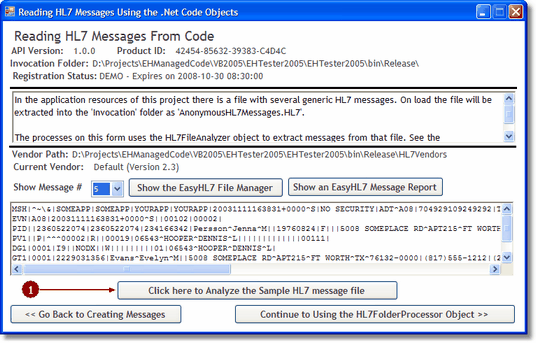
Reading HL7 Messages

PreviousNext

frmReadingMessages.vb

(c) 2007-2008 Hermetech International Ltd.

There are MANY more 'inbound' HL7 interfaces in the world than there are 'outbound'. As a result, more software developers are concerned with importing or reading HL7 data than are concerned with creating HL7 data. The EasyHL7 objects give you a great toolbox for reading HL7 message data, both from files and from system memory.


frmReadingMessages.vb


Next: frmFolderProcessor.vb


See Also: HL7FileAnalyzer Object, EasyHL7Message Object


'EXAMPLE CODE FROM THE FORM

'oVendor and oAnalyzer declared PRIVATE 

'and instantiated at form load    

Private Sub btnCreateMessage_Click(ByVal sender As System.Object, _

                                   ByVal e As System.EventArgs) Handles btnCreateMessage.Click

        Try

            Dim strFN As String

            Dim enErrorType As EHL7_mc2005.HL7FileAnalyzer.EHFA_ErrorType

            Dim i As Long

            cmbMessages.Items.Clear()

            cmbMessages.Visible = False

            lblMessages.Visible = False

            Button3.Visible = False

            Button4.Visible = False


            With oVendor

                strFN = .EasyInstallationFolder & "AnonymousHL7Messages.HL7"

                If Not IsFile(strFN) Then

                    MsgBox("The sample file AnonymousHL7Messages.HL7 not found in the invocation folder")

                    Exit Sub

                End If

                MouseON()

                enErrorType = oAnalyzer.AnalyzeHL7File(strFN)

                If enErrorType <> EHL7_mc2005.HL7FileAnalyzer.EHFA_ErrorType.EHFA_NoError Then

                    MouseOff()

                    MsgBox("An error occurred analyzing the file. Type = " & _

                    CStr(enErrorType), MsgBoxStyle.Critical, "Error")

                    Exit Sub

                End If

                MouseOff()

                MsgBox("The analysis completed. The file contains " & oAnalyzer.FileMessageCount & " messages.")

            End With

            With oAnalyzer

                For i = 1 To .FileMessageCount

                    cmbMessages.Items.Add(CStr(i))

                Next

            End With

            If cmbMessages.Items.Count > 0 Then

                cmbMessages.Visible = True

                lblMessages.Visible = True

                MsgBox("Select a message # in the listbox above to see the HL7 message!")

            End If


        Catch ex As Exception

            MouseOff()

            MsgBox(ex.ToString)

        End Try

    End Sub

'The Click on the combobox    

Private Sub cmbMessages_SelectedIndexChanged(ByVal sender As System.Object, _

            ByVal e As System.EventArgs) Handles cmbMessages.SelectedIndexChanged

        Try

            Dim myMsgPointer As EHL7_mc2005.HL7MsgFilePointer

            Button3.Visible = False

            Button4.Visible = False

            With cmbMessages

                If .Text.Length > 0 Then

                    With oAnalyzer

                        MouseON()

                        myMsgPointer = .GetHL7Message(CLng(cmbMessages.Text))

                        MouseOff()

                        'Set the TAG property in case the user edits the message

                        RichTextBox2.Tag = myMsgPointer.MessageText

                        RichTextBox2.Text = RichTextBox2.Tag

                        Button3.Visible = True

                        Button4.Visible = True

                    End With


                End If

            End With

        Catch ex As Exception

            MouseOff()

        End Try

End Sub