frmVendors.vb

PreviousNext

Connecting the objects to HL7 Vendor files.

(c) 2007-2008 Hermetech International Ltd.

The next step in any EasyHL7 application after you've determined that your objects have been registered is to establish a connection to the EasyHL7 Vendor Definitions. The Vendor definitions contain syntax and structure definition for a particular version of HL7. This is the single most important property to set in your EasyHL7 applications, since all of the HL7 methods require that you select the EasyHL7 Vendor definition to use.


Q: What are EasyHL7 Vendor Definitions?


A: See the online help for the EasyHL7 ActiveX Components AND the online white paper about working with Vendors.


This form demonstrates how to test to see if vendor definitions are installed (and install them if not), as well as examples of how to connect to them and select one.


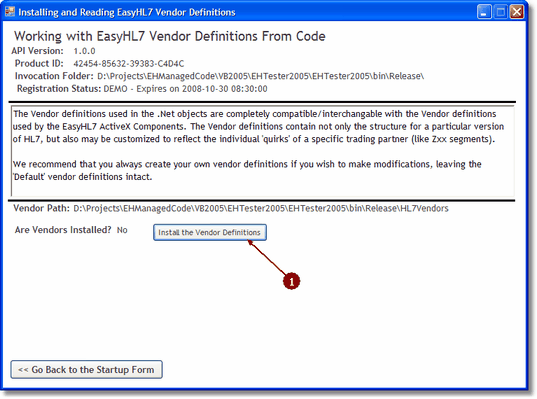
Example without Vendor Definitions Installed


Clicking 'Install the Vendor Definitions' will call a silent installation method to install the default vendor definitions.


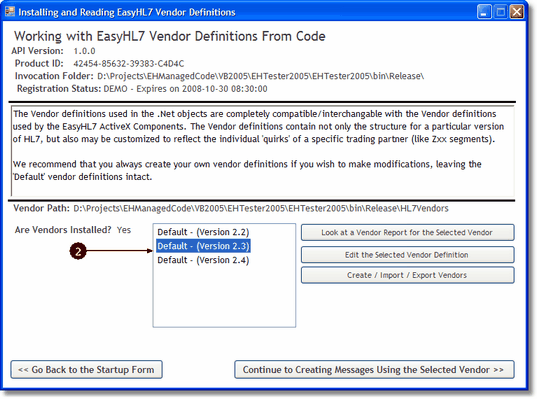
frmVendors.vb AFTER vendor definitions installed


Next: frmCreatingMessages.vb


Private Sub btnInstallVendors_Click(ByVal sender As System.Object, ByVal e As System.EventArgs) Handles btnInstallVendors.Click

 Dim sPTH As String = "", sVendors As String = ""

 Try

     'oVendor was instantiated in the LoadVendorInfo() sub

     With oVendor

         sPTH = .EasyInstallationFolder & "HL7Vendors"

         If Not IsFolder(sPTH) Then

             'Install the Default Vendors into the folder,creating it as we go

             If Not .InstallDefaultVendors(sPTH, FalseTrueThen

                 MsgBox(.LastError, MsgBoxStyle.Critical, "Error Installing Default Vendors")

                 Exit Sub

             End If

         Else

             .VendorPath = sPTH

             sVendors = .ListVendors()

             If sVendors.Length = 0 Then

                 'The folder exists, but there are no vendors

                 If Not .InstallDefaultVendors(sPTH, TrueThen

                     MsgBox(.LastError, MsgBoxStyle.Critical, "Error Installing Default Vendors")

                     Exit Sub

                 End If

             End If

         End If

         .VendorPath = sPTH

     End With

     LoadVendorInfo()

 Catch ex As Exception

     MsgBox(ex.ToString)

 End Try

End Sub


Private Sub LoadVendorInfo()

 Dim sPTH As String = "", sVendorList As String = ""

 Dim arVendors1() As String

 Dim arVendors2() As String

 Dim i As Long, nd As TreeNode

 Try

     oVendor = New EHL7_mc2005.HL7Vendor

     With VendorsTREE

         .Nodes.Clear()

         .Visible = False

     End With

     'Make other buttons invisible

     Button2.Visible = False

     btnCreateNewVendors.Visible = False

     btnShowReport.Visible = False

     btnEditVendor.Visible = False


     With oVendor

      lblVersion.Text = .APIVersionMajor & "." & .APIVersionMinor & "." & .APIRevision

      lblFolder.Text = .EasyInstallationFolder

      lblProductID.Text = .ProductID

      If Not oVendor.IsRegistered Then

          lblRegistration.Text = "Unregistered (There is no license file in the invocation folder)"

      Else

          If oVendor.IsDemo Then

              lblRegistration.Text = "DEMO - Expires on " & .LicenseExpiresOn.ToString

          Else

              If oVendor.LicenseIsRuntime Then

                  lblRegistration.Text = "RUNTIME"

              Else

                  lblRegistration.Text = "DEVELOPMENT"

              End If

          End If

      End If

      'Now let's test the vendorpath. The VendorPath property is THE MOST IMPORTANT property in the object.

      sPTH = .EasyInstallationFolder & "HL7Vendors"

      lblVendorPath.Text = sPTH


      If Not IsFolder(sPTH) Then

          lblVendorsInstalled.Text = "No"

          btnInstallVendors.Visible = True

          Exit Sub


      Else

          .VendorPath = sPTH

          sVendorList = .ListVendors

          If sVendorList = "" Then

              lblVendorsInstalled.Text = "No"

              btnInstallVendors.Visible = True

              Exit Sub

          End If

          btnInstallVendors.Visible = False

          lblVendorsInstalled.Text = "Yes"

      End If

      'Now load the vendors into the tree

      VendorsTREE.Visible = True

      arVendors1 = sVendorList.Split(vbLf)

      For i = 0 To UBound(arVendors1)

          arVendors2 = arVendors1(i).Split("|")

          'arVendors2 is now a 2 element array. 

          '0 is the vendor name/version

          '1 is the VendorID

          With VendorsTREE


              nd = .Nodes.Add(arVendors2(0))

              nd.Tag = arVendors2(1)

              If .Nodes.Count = 1 Then

                  .SelectedNode = nd

              End If

          End With

      Next

      'Enable all of the appropriate buttons

      Button2.Visible = True

      btnCreateNewVendors.Visible = True

      btnShowReport.Visible = True

      btnEditVendor.Visible = True

     End With


 Catch ex As Exception

     MsgBox(ex.ToString)

 End Try


End Sub