|
The Startup Form |
|
Covers Initialization of the Objects (formSTART.vb). (c) 2007-2008 Hermetech International Ltd. |
||
|
|||||
|
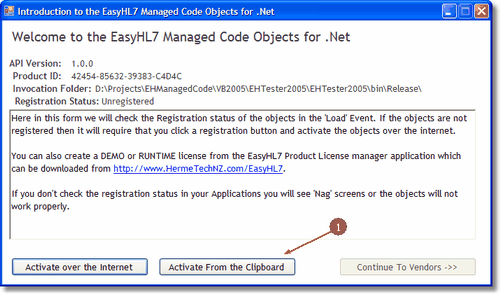
STEP 1: In any solutions you create with the .Net components for HL7 your first operation with the object should be to determine if they are registered or not. If they are not registered, the components will not work, period. If the objects are not registered this simply means that there is NOT a valid license file located in the folder where the DLL is physically located and being invoked from. See License Files for more info.
The Starting Page of the Sample Application (Unregistered)
Clicking 'Activate over the Internet' will bring up frmRegister.vb which illustrates several ways to create DEMO, RUNTIME or even DEVELOPMENT licenses directly from your code (or with our built-in interface). The 'Activate From the Clipboard' button will activate your objects using an Activation key copied to the windows clipboard (this can be done from the EasyHL7 License Manager)
See frmRegister.vb
|