|
Creating New Vendor Definitions |
|
How to create new EasyHL7 Vendor definitions (c) 2007-2008 Hermetech International Ltd. |
||
|
|||||
|
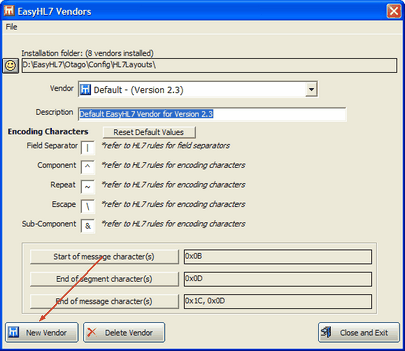
To create a new EasyHL7 vendor definition first open the EasyHL7 Vendors window and click the 'New Vendor' button.
EasyHL7 Vendors window
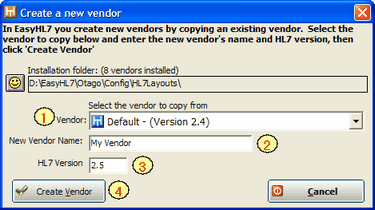
New Vendor Window
After you've created your new vendor definition it is an exact copy of the existing vendor definition you selected in step 1. You can now edit the definition as needed.
To create an entirely new version of HL7 (other than the default versions supplied with your application) is really quite simple. In the sample screenshots above the example is creating an HL7 Version 2.5 vendor definition from the existing Default HL7 Version 2.4 version. First you create the new vendor definition using the CLOSEST matching existing vendor definition. In this case, since you want to create a version 2.5 definition, you would start with the 2.4 definition.
After you've created your new vendor definition you would then review your HL7 implementation guide for the new version (obtained from HL7.org OR from your HL7 trading partner) and edit the definition making changes as needed. Note that in versions 2.X of HL7 each version is a superset of the previous version, I.E. version 2.4 contains all of the elements of version 2.3 with additions, 2.5 contains all of 2.4 with additions etc.
|