|
Importing and Exporting |
|
How to import and export EasyHL7 Vendor definitions (c) 2007-2008 Hermetech International Ltd. |
||
|
|||||
|
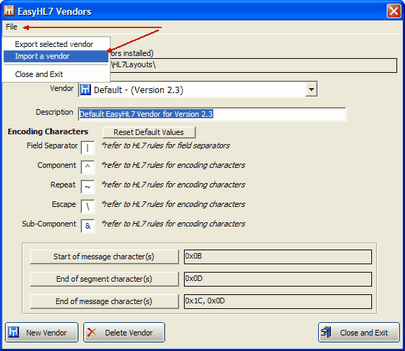
To import or export an EasyHL7 vendor definition first open the EasyHL7 Vendors window.
To import: click File -> Import a Vendor
To export: FIRST - Select which vendor definition you wish to export in the Vendor dropdown selection field, then click File -> Export selected vendor
Importing Vendor Definitions from your application at runtime using the EasyHL7 ActiveX Components
See the ImportVendor() and ExportVendor() methods in the EasyHL7 ActiveX Toolkit documentation. |