How It Works

Contents
The Visual Studio API is a Class Library DLL which you can use to create applications in Microsoft Visual Studio which can interface with a Database Schema created by the UltraPort SQL Schema Engine. The objective for the API is to make it simple for programmers to write programs that can easily:
•Retrieve and process "Work Queues" of INBOUND HL7 message data which has been imported into your Schema with an Inbound Processor.
•Easily create OUTBOUND messages in your Schema which will be picked up, assembled into HL7 messages, and exported with an Outbound Processor.
•Create your own INBOUND processor applications which can import HL7 messages directly into your Schema either "instead of" or "in addition to" your.
How much does it cost?
The API itself costs nothing, or rather, does not require you to purchase anything extra from us other than your UltraPort SQL Schema Enterprise license.
What if I want to deploy applications to a different computer?
You can create as many applications as you like using the API for free deployment on computers which are currently running a valid license for the UltraPort SQL Schema Engine or even to remote computers or VMs running Windows or Linux**
Frameworks supported?
The API is available for the Windows .Net frameworks 4 through 4.7.2 as well as .Net Standard and .Net Core 3.1.
How do I get the API DLLs?
NOTE: The API is currently still in BETA. You can become a part of the Beta if you qualify by Contacting Customer Service to inquire.

In order to use the SQLAPIKey class you need a SQL API Key. This is a blob of encrypted XML which is produced by the Database Maintenance Windows service. If enabled these API Key(s) will be placed in your <prefix>_SchemaMaster table in a field called APIKey.
In your Schema Profile click DB Maintenance and check Generate Schema Engine API Key. You can also have the database maintenance service export the Key to a file on the file system.
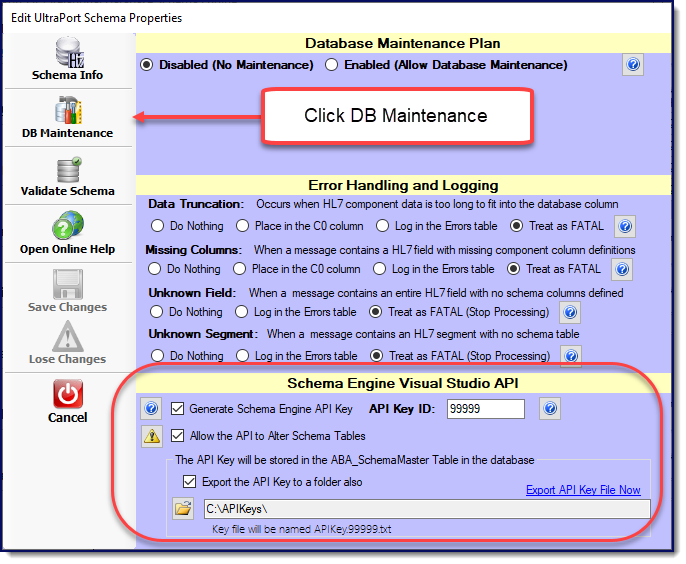 Click to Enlarge
In your Global Settings you must have the Enable automated database maintenance checked.
 Click to Enlarge
In the Service Status area you MUST have the Database Maintenance service installed and running.
 Click to Enlarge
|
Licensing. You have to have a valid license for a professional license of the UltraPort SQL Schema Engine with the API Key creation enabled and the database maintenance service running.
Tips and Tricks
Scenario: Since any APIKey value expires in 60 days, I'm running my applications in a Linux Docker container and it's a pain for me to transfer my API Key files from my windows server running the UltraPort Schema Engine. Can I automate this process using only the API?
Answer: Yes. You can effectively create a "perpetual" license by using a couple of the methods provided so that you only have to "seed" your applications once and they'll run into infinity as long as your UltraPort Database Maintenance Service is running on your MS Windows server.
C#
HTUtilities utilities = new HTUtilities(); string mykeyfile = utilities.LocalFile("MyKey.txt"); SQLSchemaAPIKey myAPI = new SQLSchemaAPIKey(mykeyfile); //Check that it's runnable and update your key file if(myAPI.IsRunnable) { bool tst = myAPI.UpdateAPIKey(); if(tst) { myAPI.ExportAPIKey(mykeyfile); } }
By using an implementation similar to this you only have to "seed" your application ONCE by placing a valid API Key File named MyKey.txt (or whatever) in the folder where your application is running in your Linux environment. Then every time you run this code it will update the file to the last APIKey value created by the Database Maintenance Service on your MS Windows server. As long as your UltraPort Schema Engine is running, your SQLSchemaAPIKey classes remain Runnable.
Caveat - Important: Since we know that every APIKey value expires 60 days after it was created by the Schema Engine, if your application doesn't actually RUN for more than 60 days you would have to "reseed" it by replacing the MyKey.txt (or whatever file name) in your folder manually. |