UltraPort MS SQL Schema Engine API

Contents
•SQLSchemaAPIKey Class. The main interface.
•SQLAPIGlobals - New Static Class.
•HTSQLHL7Message. A public (read only-ish) exposure of our parser. See new GetMessageObject() method in the HL7StringAnalyzer, and factory constructors in SQLSchemaAPIKey.
•HL7StringAnalyzer Class. Carve out HL7 messages from strings.
•HTSQLServer Connector. Your connection to your SQL Schema.
•HL7MessageEncoder. Contains HL7 message encoding information used when parsing messages.
•UPSInfo Class. Contains Schema Information. This class is the base class for the SQLHL7Importer and SchemaTrainer.
•HTException Class. This is a very important class because it illustrates how the entire API commonly handles Exceptions. We VERY rarely allow a system exception to be thrown and passed back to you. This class is also important because there a few derived classes from the EventArg class which use modifications to pass data into and back from the different EVENTS.
Before you begin.

In order to use the SQLAPIKey class you need a SQL API Key. This is a blob of encrypted XML which is produced by the Database Maintenance Windows service. If enabled these API Key(s) will be placed in your <prefix>_SchemaMaster table in a field called APIKey.
In your Schema Profile click DB Maintenance and check Generate Schema Engine API Key. You can also have the database maintenance service export the Key to a file on the file system. 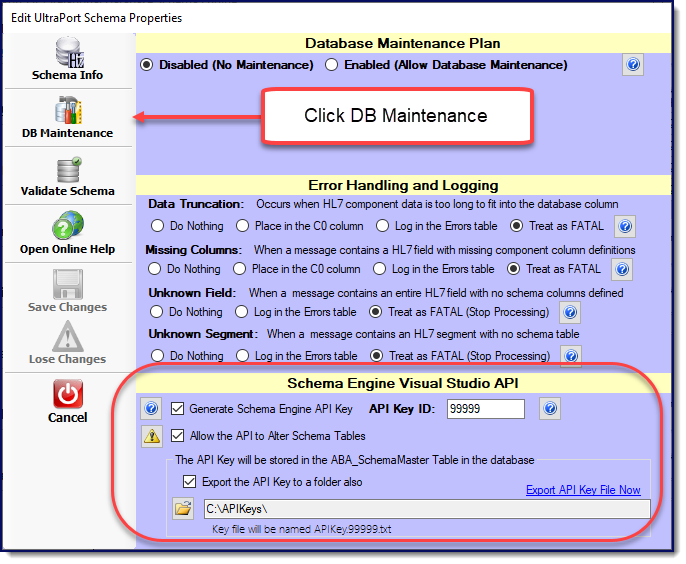 Click to Enlarge
In your Global Settings you must have the Enable automated database maintenance checked.
 Click to Enlarge
In the Service Status area you MUST have the Database Maintenance service installed and running.
 Click to Enlarge
|
Classes yet to be created or exposed in our working priority. All of the classes discussed are the "top-level" classes and likely have underlying support classes as well.
1.<Released in version 1.0.5>NEW() HL7DefinitionData class - ReadOnly encapsulation of our EasyHL7 Vendor Definition - Production Source: UltraPort HL7 Notepad 2.<In process for version 1.0.6> HTSQLHL7Message class. Our message parser. It will be readonly, in that you can Load it, you can query it, but you can't update it. 3.SchemaNavigation operations. <In process> Methods and sub-classes in the HTSQLServerConnector class for Navigating your SQL Schema. Things like, generating work queues of inbound/outbound messages, retrieving an entire HL7 message from the Database from the MessageID, etc, etc. These already exist in the legacy API we've scrapped in favor of building this new one. 4.HTImportMessage class. Derived class from the HTSQLHL7Message class. This is really just a "to be exposed" item as it's already there. It's basically what the HL7StringAnalyzer class uses for Import Operations. 5.HTExportMessage class. A read-write hybrid class of the HTSQLHL7Message and the UPSInfo class used for creating OUTBOUND HL7 messages in the Schema. You can use it to create HL7 messages (Get: Set) but you can only create based on the database schema tables. IE: With the HTSQLHL7Message class you can LOAD a HL7Message string which contains a "ZZZ" custom segment and that's fine. However, with the Export Message class, you can use it to create messages (IE New Message(), AddSegment("PID"), etc.) but you wouldn't be able to CREATE a "ZZZ" segment in your message unless supporting segment table(s) exist in the Schema IE <prefix>_Segment_ZZZ_A(B). You can't Set the value of any component of a field which doesn't exist within the Schema Segment Tables. 6.HTHL7FileAnalyzer - Our standard file mapper. 7.HTHL7FolderAnaylzer- Our standard event driven folder processor.
|
Functional Testing:
CentOS Mono: Yes
Ubuntu Mono: Yes
Windows Servers: Yes
CentOS .Net Core: No
Ubuntu .Net Core: No
Windows .Net Core: No
Stress Testing:
Windows Servers Only: Ongoing
Collision Testing:
Windows Servers Only: Ongoing