In Version 1.1 we've introduced the SQL Schema Browser. This window allows you to visually create some reasonably complex SQL Queries against the schema tables and also allows you to view the SQL that your query produced. You can run your queries and browse through the resulting messages, run message data reports and even view the contents of individual segment data tables (see Looking at Messages).
Visually build a Query
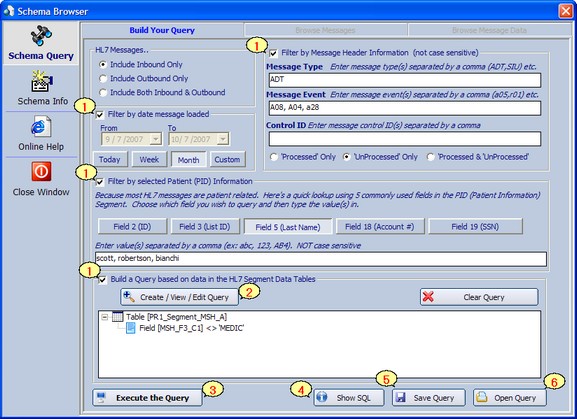
The Main Query Builder
|
Uncheck any box to exclude that section from your query. |
|
Create an extended query on almost any field in any segment of the HL7 message (see Extended Data Queries). |
|
When you've built the query you like, click the 'Execute the Query' button to run it. |
|
Click the 'Show SQL' button to see the SQL statement which will be generated by your query. Great for learning how to navigate the schema to retrieve specific messages. |
|
Every time the Query Window loads, it will automatically reload the last query you've executed. In addition, you can also save your queries to disk by clicking the Save Query button. |
|
You can load queries that you've previously saved by clicking the 'Open Query' button. |


SELECT MessageID, MsgControl, MsgType, MsgEvent, LastLoaded, SegmentCount, MessageSize,Inbound, Processed, Warnings FROM PR1_HL7Data WHERE Loaded <> 0 AND Inbound <> 0 AND (LastLoaded BETWEEN '07 Sep 2007 00:00:00' AND '08 Oct 2007 00:00:00') AND Processed = 0 AND MsgType = 'ADT' AND MsgEvent IN ('A08','A04','a28') AND MessageID IN (Select MessageID From PR1_Segment_PID_A WHERE PID_F5_C1 IN ('scott','robertson','bianchi')) AND MessageID IN ( ( Select Distinct MessageID From PR1_Segment_MSH_A WHERE MSH_F3_C1 <> 'MEDIC' )) ORDER BY LastLoaded |
See all of the messages returned by your query
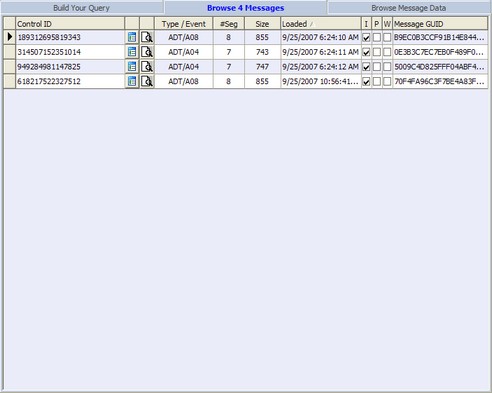
The Query Results
Drill down to individual messages and segments
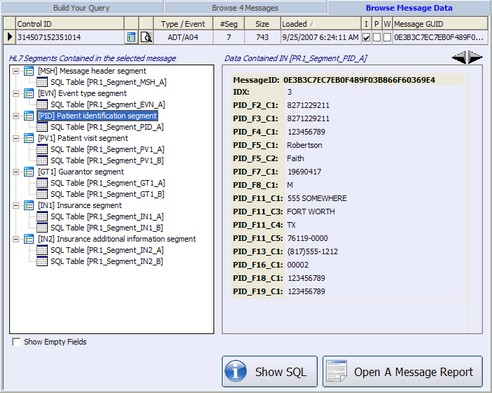
See the detail for each message
/* To select the message from the main message data table */ Select * From PR1_HL7Data Where MessageID = '0E3B3C7EC7EB0F489F03B866F60369E4'
/* To retrieve all message segments from the Message Manifest table */ Select * From PR1_MessageManifest Where MessageID = '0E3B3C7EC7EB0F489F03B866F60369E4' Order By SegmentIDX
/* To retrieve message data for a particular segment of a message */ Select * From PR1_Segment_PID_A Where MessageID = '0E3B3C7EC7EB0F489F03B866F60369E4' AND IDX = 3
/* To retrieve ALL segments of a particular type for a message, exclude the IDX column in the select statement */ Select * From PR1_Segment_PID_A Where MessageID = '0E3B3C7EC7EB0F489F03B866F60369E4' Order By IDX
|