Getting Started

Contents

YouTube - Getting Started With The UltraPort Listener
Starting the program for the first time
When you start the program for the first time you must first agree to the EULA and activate your product. There are TWO different methods of activation.
1.Online Activation over the internet.
2.Manual Activation (no internet connection). This page deals only with Online Activation see the section on Manual Activation for information about how to activate the UltraPort HL7 Listener on computers which are not connected to the internet.
Online Activation Step 1.
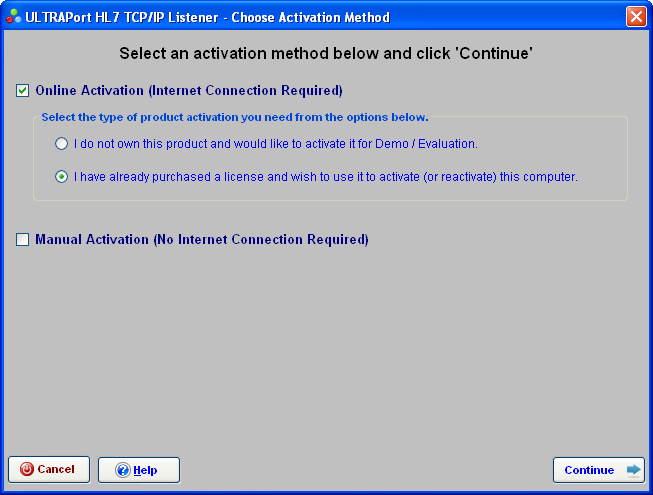
Online Activation (Step 1)
In Step 1 check the box for Online Activation and then check the type of activation (IE do you own a license or are you just evaluating the product) and the click  .
.

DEMO MODE - If you haven't purchased a license yet you can activate the software with a DEMO license which will be good for 30 days. With a DEMO license you can run up to 5 listener profiles per session. Also with a DEMO license you will not be able to register or start the MS Windows Service and must use the 'Run Locally' option which executes as a regular windows desktop application. While you are using your DEMO license your listener profiles will only run for 5 minutes before stopping automatically and then have to be restarted. This may not sound like much time, but over a fast network your listener profiles could receive up to 2-3000 HL7 messages PER LISTENER in 5 minutes. While running with your DEMO license you can activate your product with a live license at any time by clicking 'Activate Your Product' in the 'File' menu of the main window. |
Online Activation Step 2.
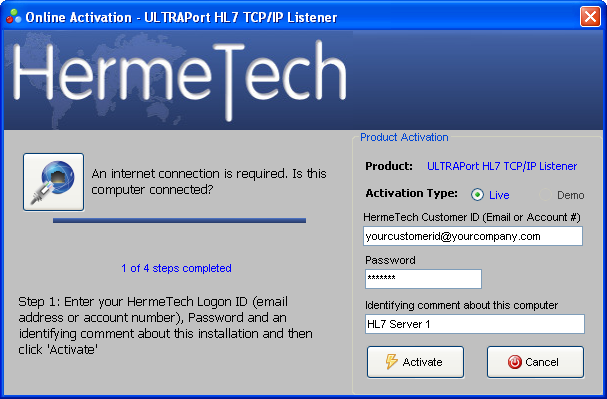
In Step 2. Just enter your login credentials (ID and Password) which you created when you registered at our website to download or purchase the software. These are
•Either your HermeTech Customer ID or Account number. (Note: this value is NOT case-sensitive)
•Your password. (Note: this value is NOT case-sensitive)
Identifying comment about this computer. This is a short descriptive comment about the particular computer you are activating. It's used in your account to help you identify particular licenses should you need customer service or support (also referred to in other documents as the 'Your Note' field). This field is required but is completely freeform so you can enter whatever value you think is appropriate.
|
When Done Click the Activate Button. |

Upgrading from an EasyHL7 Listener - The UltraPort Listener is HermeTech International's 'Next Generation' listener product. Terms and conditions apply. Contact HermeTech customer service for additional information info@hermetechnz.com
See Also: Manual Activation.