|
Creating Vendor Definitions |
|
Different ways to add Vendor Definitions to your application. (c) 2007-2008 Hermetech International Ltd. |
||
|
|||||
|
All EasyHL7 applications ship with 3 Vendor Definitions embedded into them. These are the Default definitions for HL7 versions 2.2, 2.3 and 2.4 which are the versions currently in use in over 97% of HL7 compliant interfaces worldwide! HermeTech has taken great pains to make sure that these 'Default' vendor definitions accurately represent the ANSI HL7 specifications for these versions so it is HIGHLY recommended that you DO NOT modify these definitions. If you want to add your own annotations, or user-defined (Z) segments then we recommend that you create new vendor definitions and modify those. This will insure that you always have the pristine Default versions to use as a reference for future needs.
There are two main methods of getting new Vendor Definitions into your application. You can:
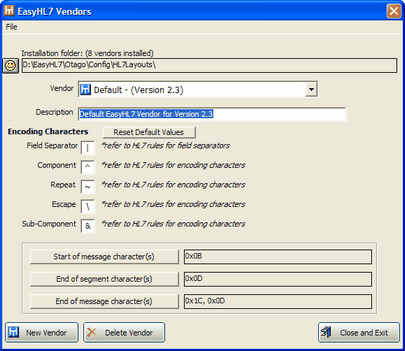
EasyHL7 Vendors Window
Open the EasyHL7 Vendors window in your application using the Windows Menu (see below):
EasyHL7.exe: Click File -> View / Edit Vendors Commando: Click HL7 -> Versions -> Create / Import / Export Database Schema Engines: Click Tools -> HL7 Versions -> Create / Import / Export Widgets (EasyHL7 Notepad etc): Click Tools -> HL7 Versions -> Create / Import / Export |