Receiving HL7 Messages

Contents
So you're ready to start receiving HL7 messages with your HL7 TCP/IP Listener! You've completed all of the prerequisite steps:
•You've downloaded and installed your UltraPort Listener (see Getting Started).
•You've created 1 or more profiles (see Listener Profiles).
•You have some HL7 messages to test with and a HL7 Sender to send them. You can't have a HL7 EDI Interface without 2 parties (a sender and a receiver). You can use our HL7 Router Simulator to test with, it also installs with a simple HL7 message data file.
And now it's time to make sure that everything works and you can receive HL7 messages over TCP/IP! From the main window click on the 'Windows Service Status' tab and you're ready to begin.
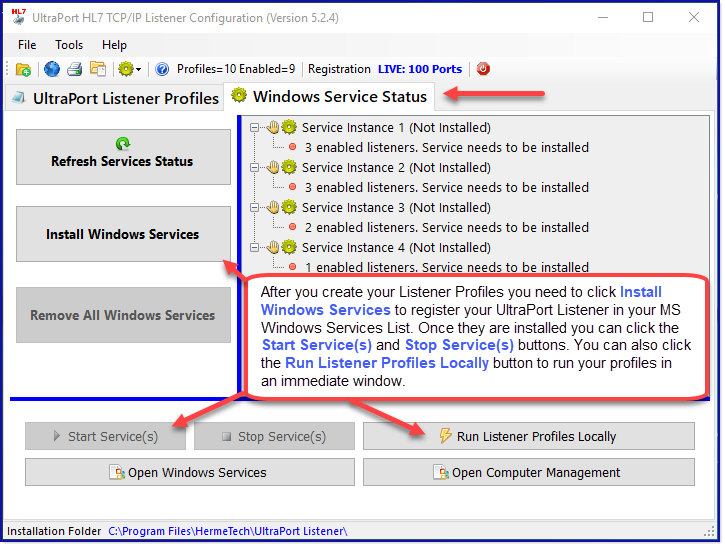
Getting Ready to Receive HL7 Messages
The UltraPort HL7 Listener profiles can be started two different ways:
1.Run in a Microsoft Windows service (see Running as a Service).
2.Run Locally, as a Windows desktop application (see Running Locally).
It is important to understand the major differences between these 2 execution methods.
Microsoft Windows services run in the background with no user interface and start when the system boots up (before anyone logs in). They run in a different memory space on your computer than your normal programs (like the web browser, word processors, etc) and (unless you configure them differently) as a different user. Service applications are fault-tolerant and can be configured to restart themselves if they crash. This is why you always want your production inbound HL7 interfaces to run as a Windows service.
Running Locally as a Windows Desktop application means that you are basically running your HL7 receiver as you, the windows user who logged into Windows. Running locally is a great way to test your outbound HL7 interface, work out connection issues, and general HL7 troubleshooting. Since it runs in a window you can actually watch it receive your HL7 messages, which, if you are testing, or troubleshooting, or developing is how you want it to run anyway.
 #1 Troubleshooting Tip: 9 out of 10 support calls we get on the UltraPort HL7 Listener software are because someone has forgotten or doesn't understand this difference. If you run it locally and it works but it does not if you run as a service, then the problem always lies in the difference between a Microsoft Windows service application and a Windows Desktop application and is usually very easy to correct. Example: If the data folder you selected in your Listener Profile is on a network share or mapped drive then this is something that YOU have access to, but the Windows Service might not. In this example it would work running locally, but might fail when running as a service.
Users with a production license can install and run the Microsoft Windows Service(s) OR they can opt to run 'locally'.
Users with a DEMO license or a Developer license can ONLY opt to run their HL7 listener profile(s) locally, they cannot install or run the MS Windows service(s).
If you have not activated your license yet see Getting Started.
Click HERE if you have a Developer license or are evaluating the product in 'Demo' mode.
Click HERE if you have a production license (or short term license).